A Smarter Calling Experience for Teams That Never Stop Multitasking
Admin
20 May 2026
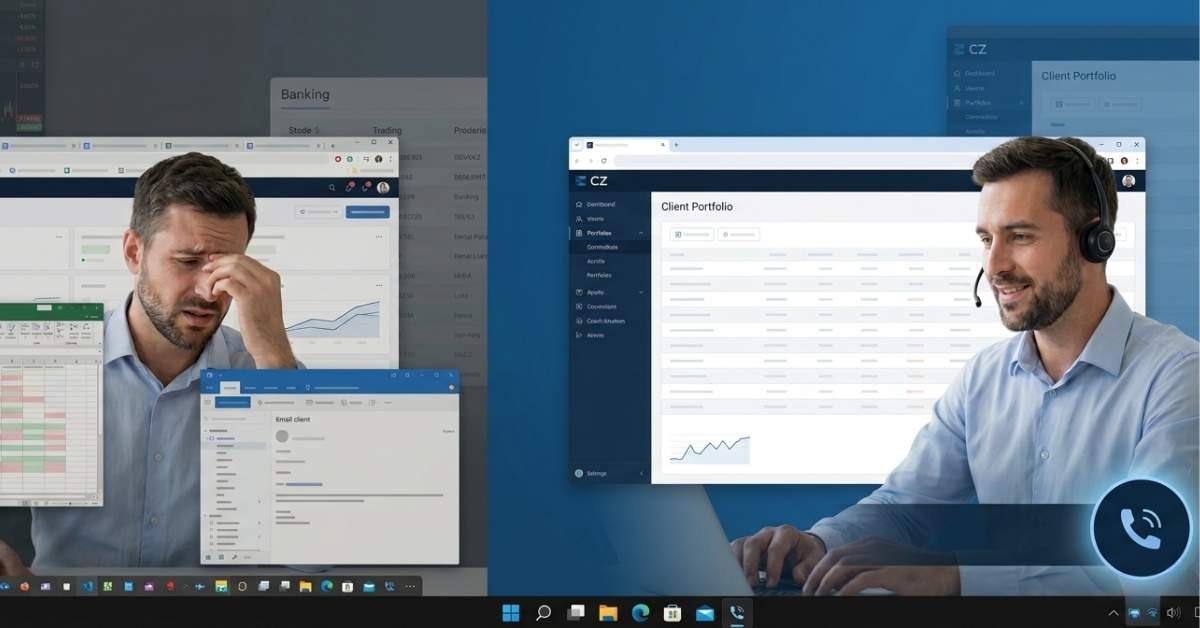
Picture a relationship manager at a mid-sized stock broking firm. It is 10:43 AM. She is in mid-conversation with a high-value client who is anxious about a market movement. She needs to pull up his portfolio, cross-check a figure in the CRM, scan an email for compliance, and verify something in the backend system. All while keeping the client calm. All in real time.
Now picture what her screen looks like. A browser tab for the calling interface. Another for the CRM. A spreadsheet opened behind it. The backend system sits in a third window. Notifications piling up in a fourth. Her entire cognitive bandwidth - the kind that should be focused on the client is being quietly drained by the one thing that was supposed to help her communicate better.
The calling tool.
"She has to continuously manage different applications while dealing with a customer. So keeping locked on a particular browser for receiving and making calls creates friction."
This isn't a niche problem. It's the defining friction of every customer-facing role like relationship managers, banking agents, sales executives, field support teams. The job has never been about a single screen. But the tools we hand them often assume it is.
The tab problem nobody talks about
When browser-based calling first arrived, it felt like a leap forward. No desk phones. No hardware to manage. Just a tab, a headset, and you're connected. And for call centers where agents live inside a single workflow - it really makes sense.
But for relationship-driven roles, the story is different. These professionals work across sprawling digital environments: CRMs, verification tools, internal dashboards, spreadsheets, email, portfolio trackers. A calling interface that claims a permanent browser window doesn't just take up space. It interrupts the rhythm of the entire workday.
The CTI widget - the embedded calling panel inside CRM platforms was an attempt to fix this. And it did, partially, for people who live in their CRM. But what about the stock broker who needs the entire screen for a trading terminal? Or the banking agent who has four different internal systems open at once? For them, the tab problem never went away. It just got more complicated.
Designing around the workflow, not against it
The insight that changed our approach was simple: for multitasking professionals, the calling experience should feel less like an application and more like a utility. The way a clock lives on a taskbar. Present, reliable, and completely invisible until you need it.
That's what a taskbar-based desktop calling application does differently. It doesn't ask users to reorganize their workflow around communication. It fits into the workflow they already have.
An incoming call? The interface surfaces instantly with all the controls you need, nothing you don't. Make an outbound call? Click and dial, without leaving what you're doing. The conversation ends, and the application recedes back to the taskbar. No clutter left behind. No tab to close. No mental overhead.
"Communication tools should work around the user. Not the other way around."
This is a small design decision with large operational consequences. When screen real estate is freed up, agents can maintain full context on what they're actually doing, for example onboarding a customer, verifying a document, analyzing a portfolio, resolving a case. The quality of the conversation improves not because the calling software got better, but because everything around it got quieter.
What this looks like for your teams
Think about the profiles where this matters most:
Relationship managers in wealth, banking, or broking, who need the full screen for client portfolios and cannot afford mid-call fumbles
Outbound sales teams running high volumes where every second of context-switching adds up across a hundred calls a day
Field support coordinators who toggle between scheduling tools, maps, email, and documentation in a single workflow
For all of them, the value isn't just convenience. It's about the compound effect of reducing small frictions across hundreds of interactions every week. Faster response times. Fewer dropped contexts. More confident agents. Customers who feel like they're being handled by someone who's fully present, not someone managing eight browser tabs.
The application also adapts to individual needs. Users can resize the widget to suit their screen setup and preference - a minor detail that signals something important about the design philosophy: the tool conforms to the user, not the other way around.
The bigger picture for operations leaders
If you're responsible for the productivity and performance of a customer-facing team, the browser tab problem is worth examining closely. It's easy to overlook because it feels small - its just a tab, just a bit of switching, just a small inconvenience. But at scale, it compounds.
Every agent who has to navigate back to a calling tab mid-conversation is spending cognitive energy they could be spending on the customer. Every missed incoming call because the interface was buried under other windows is a moment of trust lost. Every slow handoff or fumbled lookup is friction that the customer feels, even if they can't name it.
The future of enterprise communication isn't more screens, more integrations, or more features. It's less friction. It's building the infrastructure of communication so tightly around how people actually work that it becomes invisible. It's a capability in the background, not a tool demanding attention.
A taskbar-based desktop calling application is one step toward that. Not because it's the flashiest piece of technology in the market, but because it solves the right problem. The quiet, daily, expensive problem of context-switching for people whose entire job depends on being fully present. Welcome to CZ Desktop App!
"The best communication tool is the one your agents stop thinking about — because it's just working, in the background, exactly when they need it."
A desktop call center application sits in your system taskbar rather than a browser tab. It surfaces instantly when you need to make or receive a call and recedes once the conversation ends, keeping your screen free for everything else you are working on.
Web-based calling requires a permanent browser tab, creating screen clutter and constant switching. Softphones demand their own window space. A taskbar-based desktop app works like a system utility, always available, never intrusive, and built around your workflow rather than competing with it.
Teams that multitask across multiple systems benefit most, relationship managers handling client portfolios, outbound sales teams running high call volumes, banking agents navigating compliance tools, and field support coordinators juggling schedules and documentation. Any role where full screen focus directly impacts the quality of the customer conversation.
Enjoy monthly insights, blogs and more industry content, delivered to your inbox.
We use cookies and similar technologies to enhance your experience, analyze site traffic, and deliver personalized content.
You can choose which types of cookies to allow. We respect your privacy choices. Essential cookies are always active to ensure basic functionality.
Cookie Policy
·
Privacy Policy